Cut list generator with labels
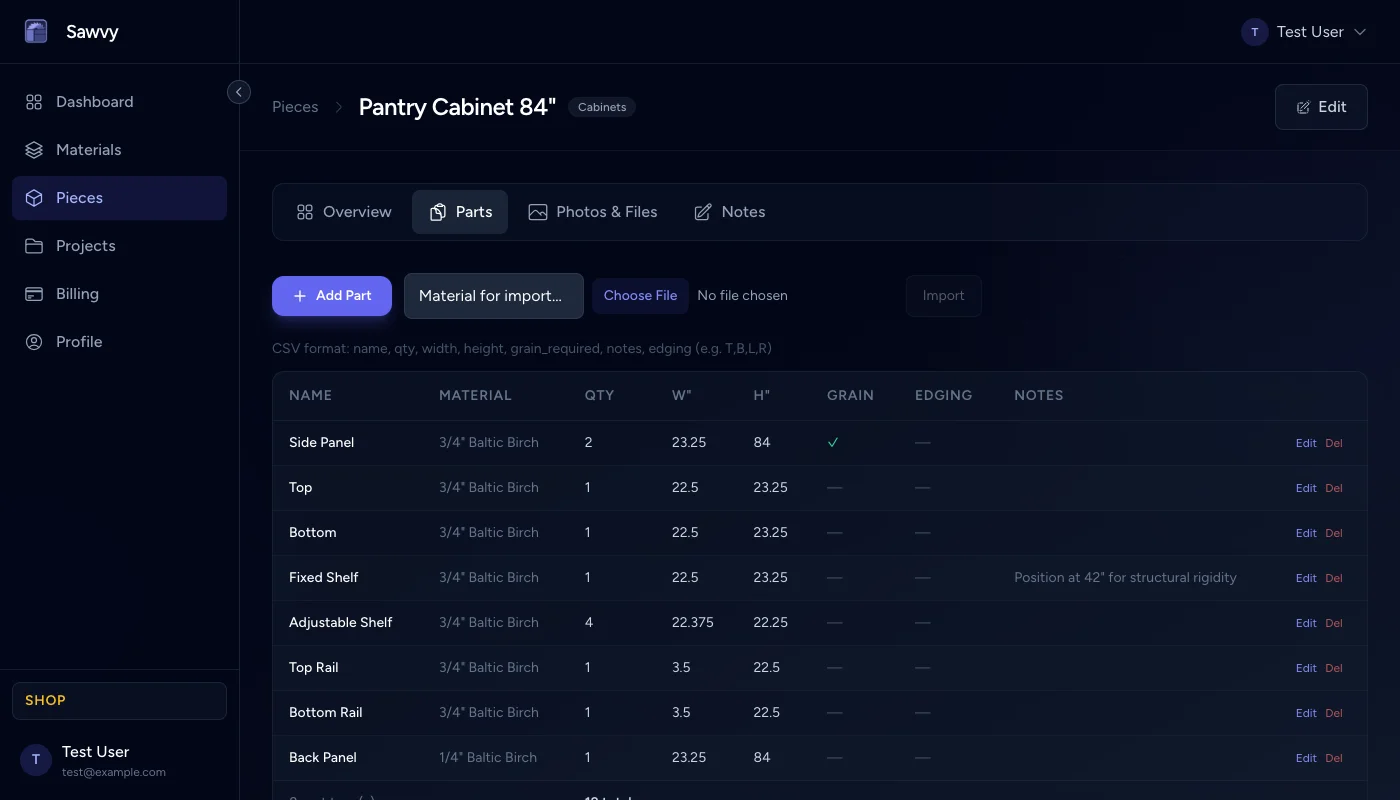
Sawvy makes it easy to build and manage your cut list. Every part gets a name, dimensions, material assignment, quantity, and optional grain and edge banding flags.
Simple part entry
Create a piece, then add parts in seconds: name each one, set the width and height, choose a quantity, and assign it to a material. No CAD experience needed. If a part needs grain matching or edge banding on specific sides, toggle those options and the system tracks them automatically.
Material assignment
Each part is assigned to a specific material (e.g., "3/4 Birch Plywood" or "1/2 MDF"). When you run the optimizer, Sawvy groups parts by material and nests each group onto the correct sheet size. You can define as many materials as your project requires.
Edge banding tracking
For parts that need edge banding, you can flag which edges (top, bottom, left, right) require it. This information carries through to the cut sheet PDF, so whoever is doing the banding knows at a glance which edges to cover.
Spreadsheets vs. Sawvy
Without Sawvy
- Parts in a spreadsheet with no connection to materials
- Manual calculation of total material needed
- No visual layout — just rows of numbers
- Edge banding tracked in a separate column or not at all
- Re-type everything when dimensions change
With Sawvy
- Parts linked to specific materials with defined sheet sizes
- Automatic material calculation via the optimizer
- Visual sheet layout diagrams with labeled parts
- Per-edge banding flags on each part
- Change a dimension and re-optimize in seconds
Start optimizing your cuts today
Join woodworkers who are saving time, materials, and money with Sawvy.