Printable cut sheets & PDF export
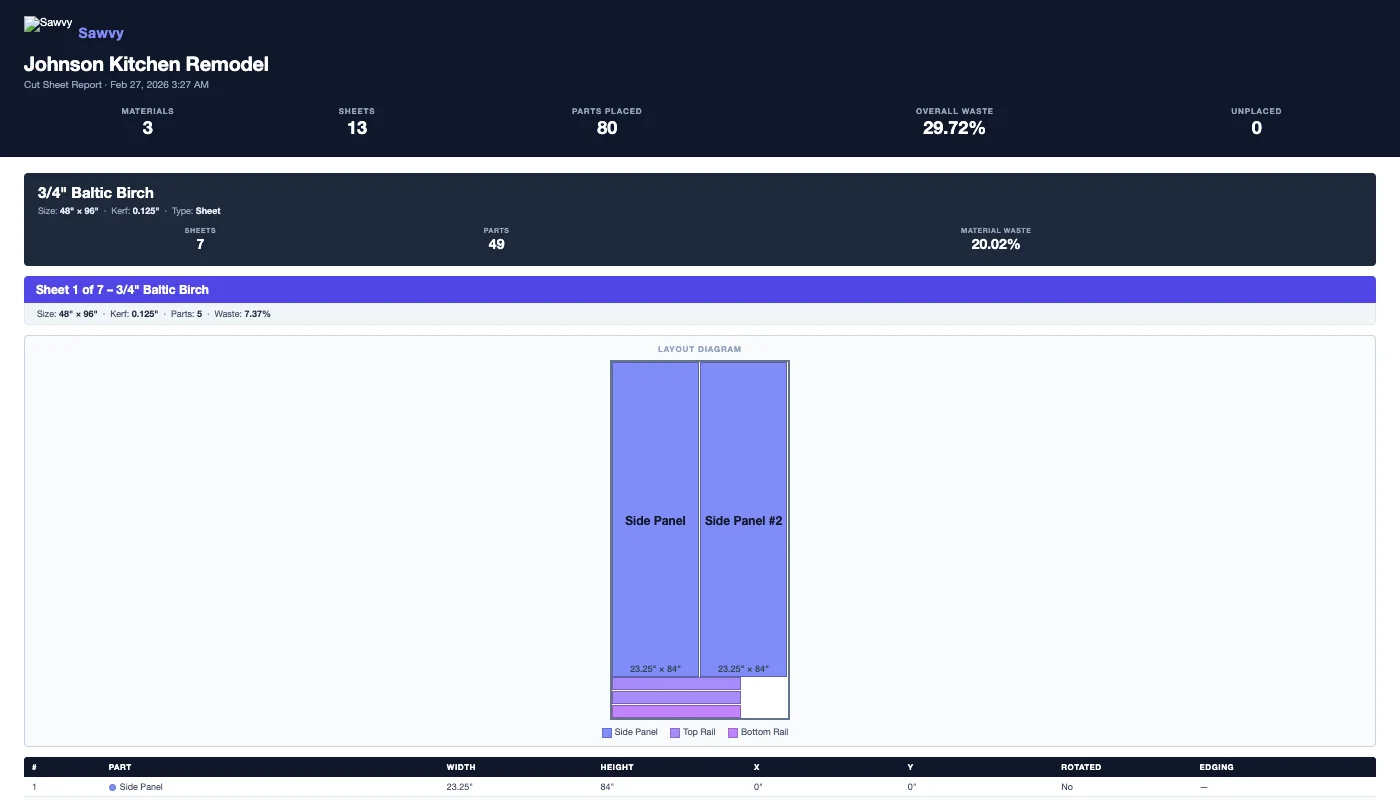
The optimizer is only useful if you can take the layout to the saw. Sawvy generates clean, labeled PDF cut sheets with sheet-by-sheet diagrams and a complete parts table. Print them, share them, or keep them for your records.
Sheet-by-sheet diagrams
Each page of the PDF shows one sheet with all parts drawn to scale. Parts are labeled with their name and dimensions so you can identify every part at a glance. The sheet number and material name are shown at the top.
Parts summary table
The PDF includes a summary table listing every part: name, dimensions, quantity, material, and edge banding flags. This doubles as a cutting checklist — mark off each part as you cut it.
Waste visualization
Unused areas on each sheet are clearly marked, so you can see exactly where the waste is. This is helpful for identifying offcuts large enough to save for future projects.
Download and share
PDFs are generated on the server and available for instant download. Share them with a shop helper, email them to a client for approval, or archive them with your project records. The file is ready to print on standard letter or A4 paper.
Hand-drawn layouts vs. Sawvy PDFs
Without Sawvy
- Sketch layouts by hand on paper or the sheet itself
- Measurements written in pencil that smudge in the shop
- No record of the layout after cutting is done
- Hard to share layouts with helpers or clients
- Re-draw everything if a part changes
With Sawvy
- Professional labeled diagrams generated in seconds
- Clear, printed dimensions that don't smudge
- PDF saved to your project for future reference
- Easy to share via email or print multiple copies
- Re-optimize and re-export in one click when parts change
Start optimizing your cuts today
Join woodworkers who are saving time, materials, and money with Sawvy.